











Guide
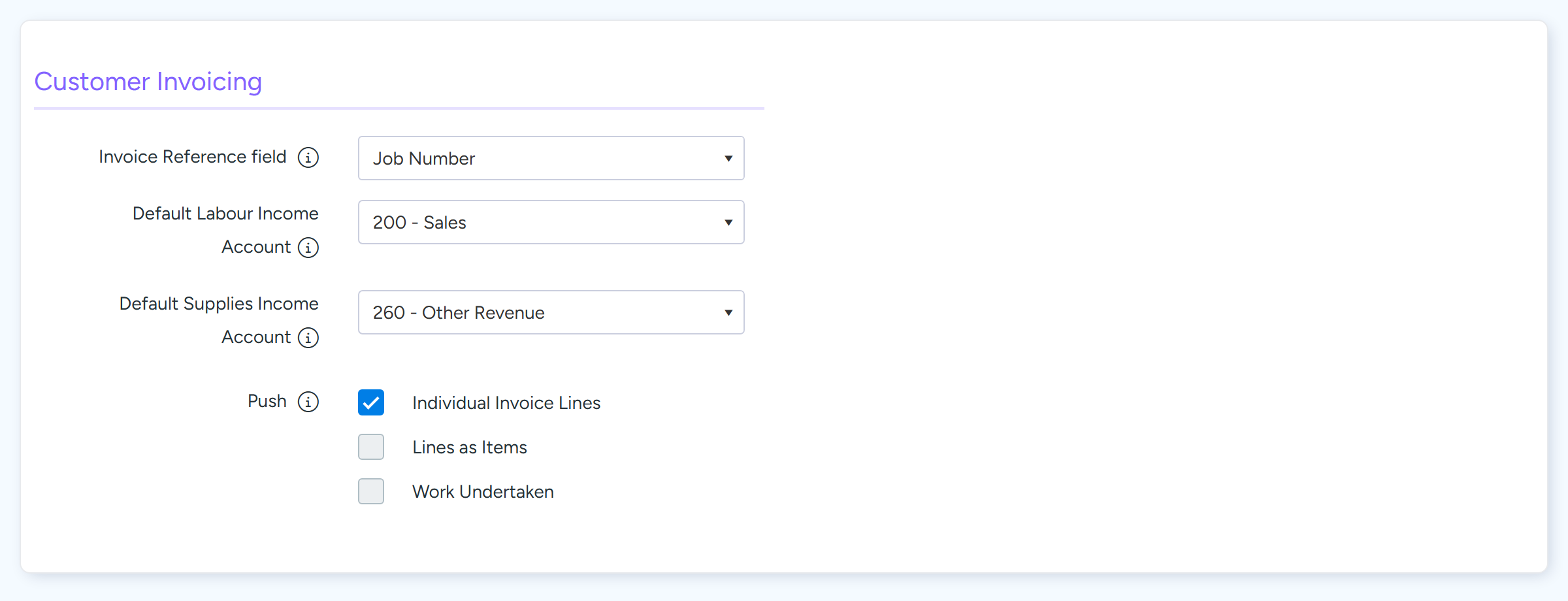
When an Invoice goes to your accounting package, every line carries an income account code. Ascora picks that code by checking a short list of places in a fixed order and using the first one that has a code.
This article is for whoever looks after your accounts and wonders why labour and supplies on the same Invoice post to different accounts.
The short answer
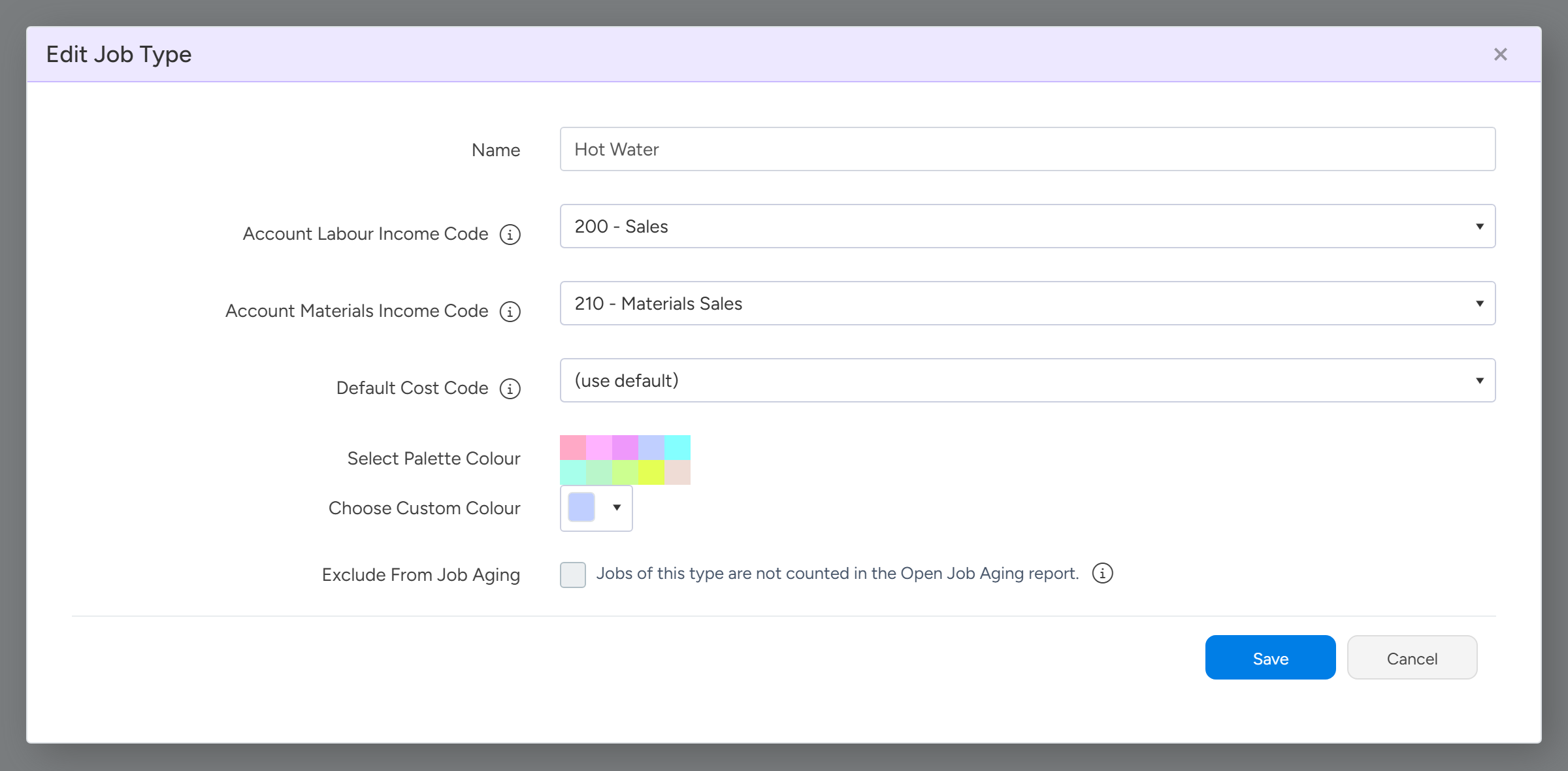
The most specific setting wins. A code on the line itself beats a code on the item. A code on the item beats the Job Type. The Job Type beats the defaults in Accounts Integration.
Leave a setting blank when you want the next one down to apply.
The order for each kind of line
- Supply line: the line's own Account Income Code, then the Supply's Account Income Code, then the Job Type's Account Materials Income Code, then Default Supplies Income Account.
- Kit line: the line's own code, then the Kit's Account Income Code, then the Job Type's Account Materials Income Code, then Default Supplies Income Account.
- Labour line: the line's own Account Income Code (when that field is shown), then the Labour Role's Account Income Code, then the Job Type's Account Labour Income Code, then Default Labour Income Account.
- Callout fee: the Job Type's Account Labour Income Code, then Default Labour Income Account. A callout fee has no code of its own.
- Progress claim section: the Account Code on the claim section, then the Job Type's Account Materials Income Code, then Default Supplies Income Account.
- Credit card surcharge: the Payment Method's Surcharge Income Account, then the Job Type's Account Materials Income Code, then Default Supplies Income Account.
- Retention: Retention Income Account, then the Job Type's Account Materials Income Code, then Default Supplies Income Account.
Note
The code is chosen when the Invoice is created and is kept on the line. Changing a Supply, a Job Type or a default afterwards changes new Invoices, not ones that already exist.
Where each setting is
- Defaults: Administration > Accounts Integration, under Customer Invoicing: Default Labour Income Account and Default Supplies Income Account. Retention Income Account is on the same page.
- Job Type: Administration > Jobs > Job Types: Account Labour Income Code and Account Materials Income Code.
- Labour Role: Administration > Labour & Callouts > Labour Roles: Account Income Code.
- Supply: the Supply's own screen: Account Income Code.
- Kit: the Kit's own screen: Account Income Code.
- Payment Method: Administration > Payments & Tax > Payment Methods: Surcharge Income Account.
- The line itself: edit the supply line on the Job or Quote to see Account Income Code. Labour lines show the field when Show Account Income Code on Labour is ticked under Administration > Invoices.
If you use more than one company
When Separate Accounting Settings per Company is ticked in Accounts Integration, each company has its own codes on Supplies, Kits, Labour Roles, Job Types and Payment Methods, and its own defaults. The order above is the same. The company on the Invoice decides which set is used.
QuickBooks
The order is the same for Xero, MYOB and QuickBooks. In QuickBooks the codes you choose from are your Products and Services items that have an income account, not the accounts themselves.
A new account is missing from the list
Add the account in your accounting package first.
In Ascora, go to Administration > Accounts Integration.
Select Refresh Chart of Accounts.
Ascora does not pick up new accounts on its own. The new code appears in the lists after the refresh.
Supplier Invoices
A Supplier Invoice line uses its own code first, then the Supplier Invoice Code on the Supplier Invoice.
When you enter a Supplier Invoice, that code is filled in from the Supplier's Supplier Invoice/Expense Account, and if that is blank, from Default Supplier Invoice Account in Accounts Integration.
Common questions
Why do labour and supplies on one Invoice post to different accounts?
They follow separate lists. Labour ends at Default Labour Income Account and supplies end at Default Supplies Income Account, and a Job Type has one code for each.
I want everything for one kind of work to go to one account. Where do I set it?
On the Job Type. Set both Account Labour Income Code and Account Materials Income Code, and leave the code blank on the Supplies and Labour Roles used on those Jobs, because a code on the item wins over the Job Type.
An Invoice shows an Accounting Message about a missing or invalid income account. What do I check?
Work down the list for that kind of line. The usual cause is a line with no code on the item, no code on the Job Type and no default set, or a code that no longer exists in your accounting package.